Example · Home automation · Sensors & devices · Agents
A home that remembers
Home Assistant forgets after ten days. Here every change is kept, explained for agents and asked about in plain words.
 Home Assistant
Verified 23 October 2026
Give your home a longer memory.
Home Assistant's recorder keeps every change for about ten days, then only hourly averages. For the questions a house actually raises you want all of it, for years: what the solar panels made, what the car took, how warm the house was last winter.
This is a family house in Spain with solar panels on the roof, a car charger driven by a smart-charging automation, air conditioning in four rooms, motorised blinds and 33 lights. Since 4 October every change Home Assistant sees lands in one table of a private catalog, home, and an agent answers questions over it.
- Home Assistantone automation, every minute
- Device sinka private address that writes rows
- home catalogha.states and its AGENTS.md
- Claude and your agentdashboards and questions
- state changes since 4 October
- 330,500
- entities, from the inverter to the blinds
- 194
- is all they take as a table
- 3.7 MB
- from a change in the house to a query
- 6 min
Counted in the home catalog on 23 October 2026.
Before you start
- Home AssistantAny install whose configuration folder your agent can reach.
- An agentClaude Code or Codex on the computer that holds Home Assistant's configuration.
- No account to startThe agent makes a catalog. You keep it with one link and a code.
- Claude (optional)For the dashboard: the LakehouseBox connector in Claude's settings.
Start with one prompt
Open Claude Code (or Codex) on the computer that holds Home Assistant's configuration, and paste this.
Check out the LakehouseBox skill for Home Assistant (lakehousebox.com/docs/guides/home-assistant/), and get me started moving my Home Assistant history data to LakehouseBox.
The history is in LakehouseBox. Here is what I did, and the one thing I need from you.
Done: with no saved key and nobody at the keyboard, I made a catalog with lhbox new (no account yet). I took a consistent snapshot of the recorder's database, never the live file, and moved every state change it held plus its hourly statistics: 310 rows from 40 entities. I left out device_tracker (locations); say if you want it.
What I need from you: open the link I give you, sign up or log in, type the code, choose where the catalog goes and pick read and write, so I can switch on the live feed. Unclaimed, it is deleted in 72 hours.
- Gets a catalog of its own with no account; it is kept 72 hours unless you keep it
- Copies a snapshot of Home Assistant's database, never touching the live one
- Moves every state change of the last 10 days and every hourly statistic Home Assistant ever kept
- Leaves out location history unless you say yes
- Answers a first question from your data, so you can see it arrived
With the LakehouseBox plugin installed (/plugin marketplace add lakehousebox/agent-skills, then /plugin install lakehousebox@lakehousebox in Claude Code), your agent finds the skill by itself. The link in the prompt works without it.
Verified · 12 October 2026
Keep it
One link and one code: the only step that is yours.
Your turn · in the browser
Keep your history
Open the link your agent gives you. Sign up or log in, type the code from your agent's message (never from a link someone sent you), and choose where the catalog goes. Pick read and write: with read only, your agent cannot switch on the live feed and has to ask again.
Let it keep flowing
The agent connects Home Assistant, so every change arrives once a minute.
- Creates a private address for Home Assistant and keeps it in your secrets.yaml
- Backs up your configuration, then adds one automation and a sensor that tells you if uploads stop
- Runs Home Assistant's own configuration check, then restarts it once
- Checks the first rows arrive, and fills in the minutes between the move and the restart
Every minute in which something changed, Home Assistant sends the new state of each entity: thermostats with the room temperature, the setpoint and whether they are cooling, blinds with their position, lights with their brightness, sensors with their value and unit, and every attribute. A minute with no change sends nothing.
Verified · 23 October 2026
Tell agents what your house means
sensor.power_meter_exported means nothing to an agent until someone says it is a counter.
A catalog can carry an AGENTS.md: notes from its owner that every agent opening the catalog is pointed to. This house's notes say which counters only ever grow, which sign means buying and which selling, what each hour of the tariff costs, and the rule the car charger follows.
Write an AGENTS.md for the home catalog: what the energy counters mean, our tariff and its three periods, and the car charging rules, so any agent reading this catalog gets the sums right.
Done: lhbox catalog agents-md home --set AGENTS.md. It explains the three cumulative counters (bought, sold, produced) and how to turn them into energy per day, the sign of the grid power, the three tariff periods with their prices, and the charging rule: from the grid only in the cheap night hours, otherwise only from solar surplus. It ends with a query for energy per day and period that I checked against the table.
| entity_id | meaning |
|---|---|
sensor.power_meter_consumption |
grid import, cumulative kWh (what the house buys) |
sensor.power_meter_exported |
grid export, cumulative kWh (sold at 0.04 €/kWh) |
sensor.inverter_total_yield |
solar production, cumulative kWh |
sensor.power_meter_active_power |
grid power now, W: positive = export |
From the catalog's AGENTS.md: the counters an agent needs for any energy question.
See it on a dashboard
In Claude, connect LakehouseBox and ask: Claude writes the queries and draws them, live.
Your turn · in Claude
Connect LakehouseBox in Claude
In Claude's settings, under Connectors, add LakehouseBox (https://mcp.lakehousebox.com/mcp) and approve it. On the approval page, tick read on your catalog: the connector sees only the catalogs you tick.
From the home catalog, show me per day what the solar panels made, what we bought from the grid and what we sold.
Here are the 18 full days since the feed started. The panels made 4.6 to 17.5 kWh a day. The house bought the most on 12, 17, 18 and 20 October, the days the car charged longest from the grid at the cheap rate; 12 October, a national holiday, was cheap all day.
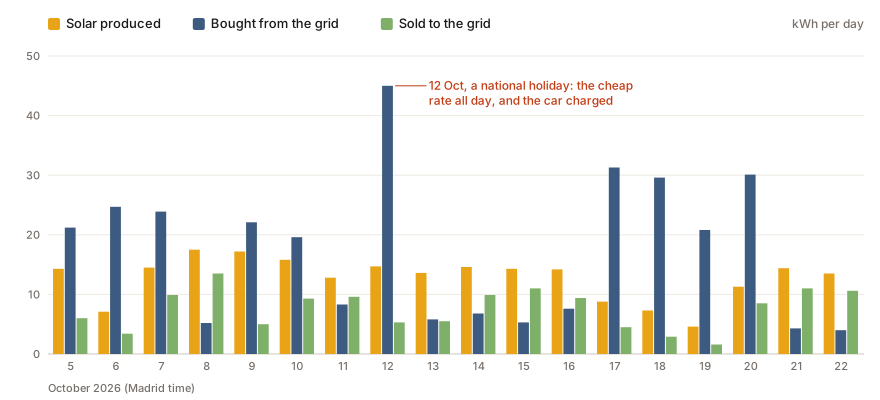
Energy per day, from the three counters
WITH daily AS (
  SELECT entity_id, CAST(timezone('Europe/Madrid', event_time) AS DATE) AS day, max(value) AS v
  FROM home.ha.states
  WHERE entity_id IN ('sensor.power_meter_consumption', 'sensor.power_meter_exported', 'sensor.inverter_total_yield')
    AND value IS NOT NULL
  GROUP BY ALL),
d AS (SELECT entity_id, day, v - lag(v) OVER (PARTITION BY entity_id ORDER BY day) AS kwh FROM daily)
SELECT day,
  round(sum(kwh) FILTER (WHERE entity_id = 'sensor.inverter_total_yield'), 1) AS solar_kwh,
  round(sum(kwh) FILTER (WHERE entity_id = 'sensor.power_meter_consumption'), 1) AS bought_kwh,
  round(sum(kwh) FILTER (WHERE entity_id = 'sensor.power_meter_exported'), 1) AS sold_kwh
FROM d WHERE kwh IS NOT NULL
GROUP BY day ORDER BY day;
A dashboard runs its queries with each viewer's own access: someone you share it with needs read on the catalog.
Ask it a question
The charger's automation writes its decision every minute to sensor.ev_charging_decision, so the rule it is meant to follow can be checked against what it did. Did the car ever charge from the grid outside the cheap hours?
When the car charged, by tariff period
SELECT split_part(state, ' ', 2) AS period,
  regexp_extract(state, 'mode=(\w+)', 1) AS mode,
  count(*) AS minutes_charging,
  round(avg(TRY_CAST(regexp_extract(state, 'grid=(-?\d+)W', 1) AS INT))) AS avg_grid_w
FROM home.ha.states
WHERE entity_id = 'sensor.ev_charging_decision'
  AND regexp_extract(state, '-> (\S+)$', 1) NOT IN ('idle', 'pause')
GROUP BY ALL ORDER BY 1, 2;| period | mode | minutes_charging | avg_grid_w |
|---|---|---|---|
| llano | solar | 409 | 819 |
| punta | solar | 190 | 656 |
| valle | grid | 6,025 | −1,522 |
| valle | solar | 43 | −436 |
No. In the dearer periods (llano, punta) the car charged only in solar mode, and the house was still selling 650 to 820 W on average while it did. Charging from the grid happened only in valle, the cheap night and weekend rate.
How warm did the house get last week, and when was the air conditioning on?
What did electricity cost us yesterday, by tariff period?
How much of the solar we made did we use ourselves this month?
Email me every morning what yesterday's electricity cost.
What to know
History older than what Home Assistant still holds when you start is gone: its states of the last ten days and its hourly statistics since it was installed are moved, nothing before. A device that changes several times within one minute keeps only its last value. If the internet or LakehouseBox is down, those minutes are not sent again, and the sensor your agent added turns on so you know. Location history is left out unless you say yes. The home catalog is private: a home's data says who is in and when.